
If you’re new here: OneCamp is a self-hosted workspace (chat, tasks, docs, calls, calendar and AI agents) that you install on your own server. It is open source and free for up to 25 people.
Yesterday’s post introduced the workload: who has too much to do each week, counted in tasks. Tasks aren’t all the same size, though, and people aren’t there every week. This release fixes both, and makes it easier to move in from monday.com.
Estimates
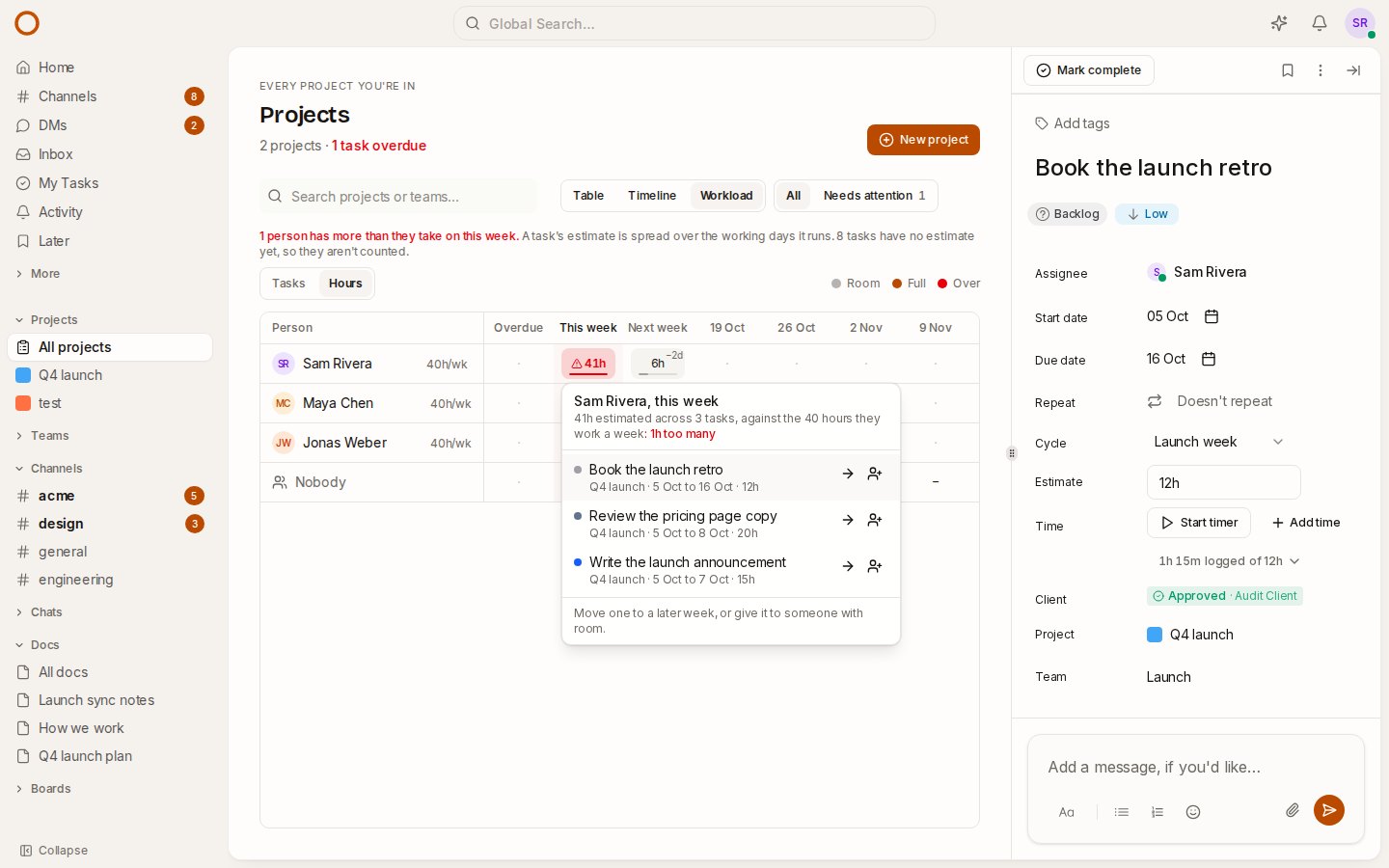
Every task now has an Estimate row in its panel. Type how long it should take: 2h, 1h 30m, 1.5h, or just 8 for eight hours.
The Time row underneath then reads, for example, “1h 15m logged of 12h”. It turns red once the time logged runs past the estimate, so you can see a task going over while it’s still in progress, not on the invoice.
A project’s admins set estimates, and each change goes into the task’s history.
The workload, in hours
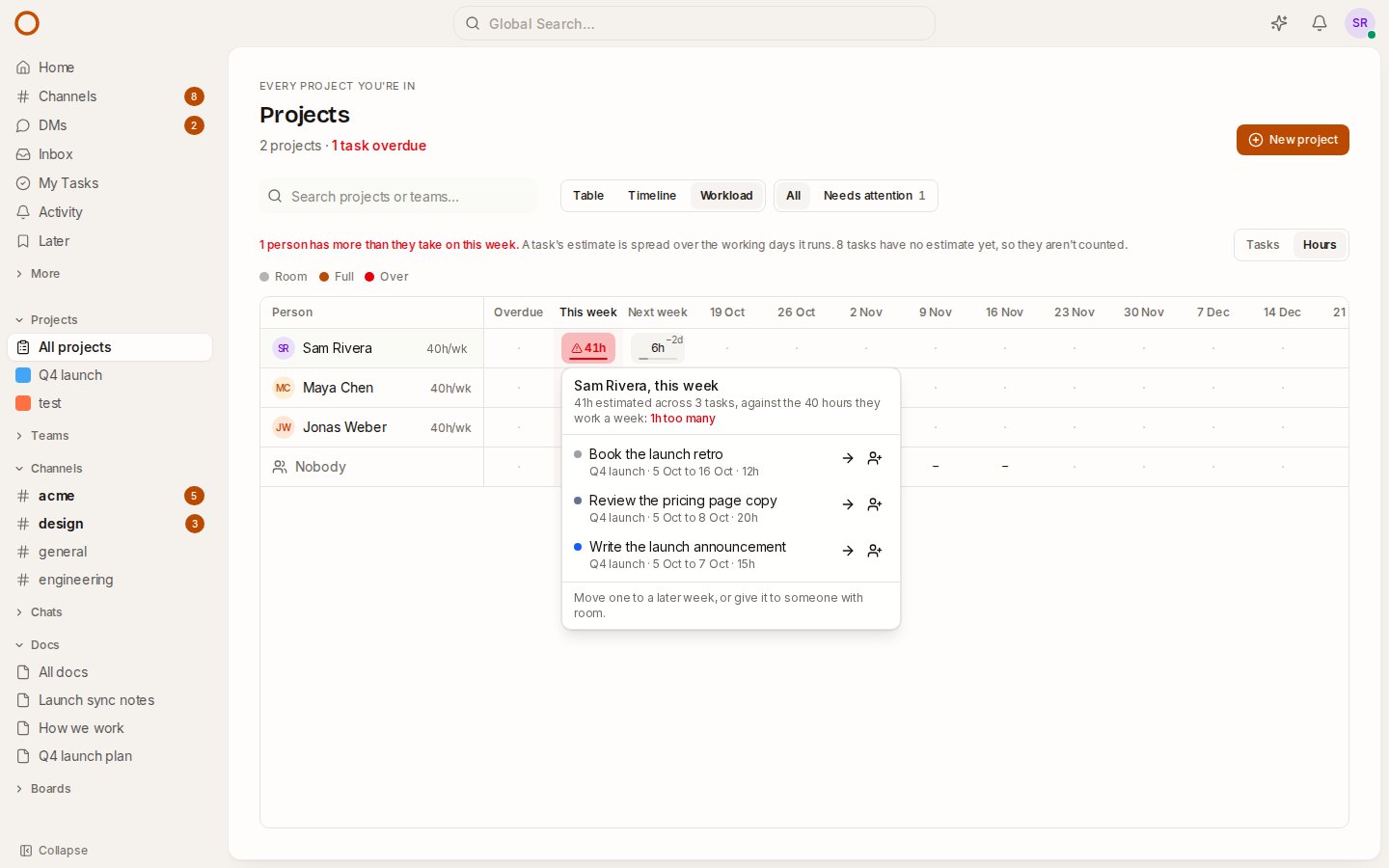
Above the workload grid there’s now a Tasks / Hours switch. In hours:
- Each task’s estimate is spread over the working days it runs. A 10-hour task from Thursday to the next Wednesday is 4 hours this week and 6 the next.
- Each person works 40 hours a week unless you change it. Click 40h/wk next to a name: your own, or anyone’s if you’re a workspace admin.
- A week over someone’s hours turns red, with how many hours too many, as the picture shows.
- Weeks whose tasks have no estimate yet show a dash, not 0h. The line above the grid says how many tasks aren’t being counted, so you know how much to trust the totals.
If you don’t estimate, nothing changes: tasks mode works exactly as before.
Time off comes out of the week
Mark time off where you already keep your days: make a calendar event and tick Away. It becomes whole days, and shows muted on the calendar so it doesn’t look like a meeting.
The workload takes those working days out of that week’s capacity, in tasks and in hours:
- Two days away in a 40-hour week leaves 24 hours.
- A week off leaves nothing, and its cell says Away.
- Give it to… marks who’s away that week and lists them last, so you don’t hand work to someone who isn’t there.
Only the dates are shared: nobody sees what your event was called. And if your team spans time zones, a day off counts as one day for everyone, not two.
Bring your boards from monday.com
Admin → Import now has monday.com next to Asana, ClickUp, Jira, Linear, Trello, Notion and Todoist. Paste a personal API token (your avatar → Developers → My access tokens), pick a workspace, and check the plan before anything is written:
- Boards become projects, and items become tasks.
- The Status column becomes the status. “Working on it”, “Stuck”, “Done” and friends are mapped for you, and you can change any of them.
- The people column becomes the assignee, a timeline or date columns the dates, and tags the labels.
- Subitems become subtasks and updates become comments, with their files.
- Columns OneCamp has no place for are kept as a list in the task’s description, so nothing silently disappears.
If an import isn’t what you wanted, Roll back takes out everything it made. The import guide covers every tool.
Fixed: subtasks from ClickUp and Linear
ClickUp subtasks and Linear sub-issues were being left out of imports, without any error. They now come across under their parent tasks, with their own comments and files.
Nested ones, a subtask of a subtask, go under the top-level task, since OneCamp’s subtasks are one level deep. If a subtask’s parent never arrives, the import says so in its error list rather than dropping it quietly.
How it compares
- Asana keeps workload for its Advanced plan.
- monday.com keeps workload and the dependency column for Pro, sold in seat buckets.
- ClickUp counts workload in estimates on its paid plans, and capacity per day needs Business Plus.
In OneCamp, estimates, workload in hours and time off are in every edition, including the free one for up to 25 people, on your own server. There are new pages comparing OneCamp with Asana and monday.com, including what each still does better.
Try it
- Open the workload in the live demo, switch to Hours, and give a task an estimate from its panel.
- On your own server: onemana.dev/free gives you the install command, no email needed.
- The guides: Workload, Time tracking and Import from other tools.
- Already running OneCamp? Update to the latest release, with AI or without.