
If you’re new here: OneCamp is a self-hosted workspace (chat, tasks, docs, calls, calendar and AI agents) that you install on your own server. It is open source and free for up to 25 people.
The last few releases were about the work itself: tasks that wait on each other, and a workload in hours, with time off. This one is about why the work is being done. OneCamp now has goals.
What a goal is
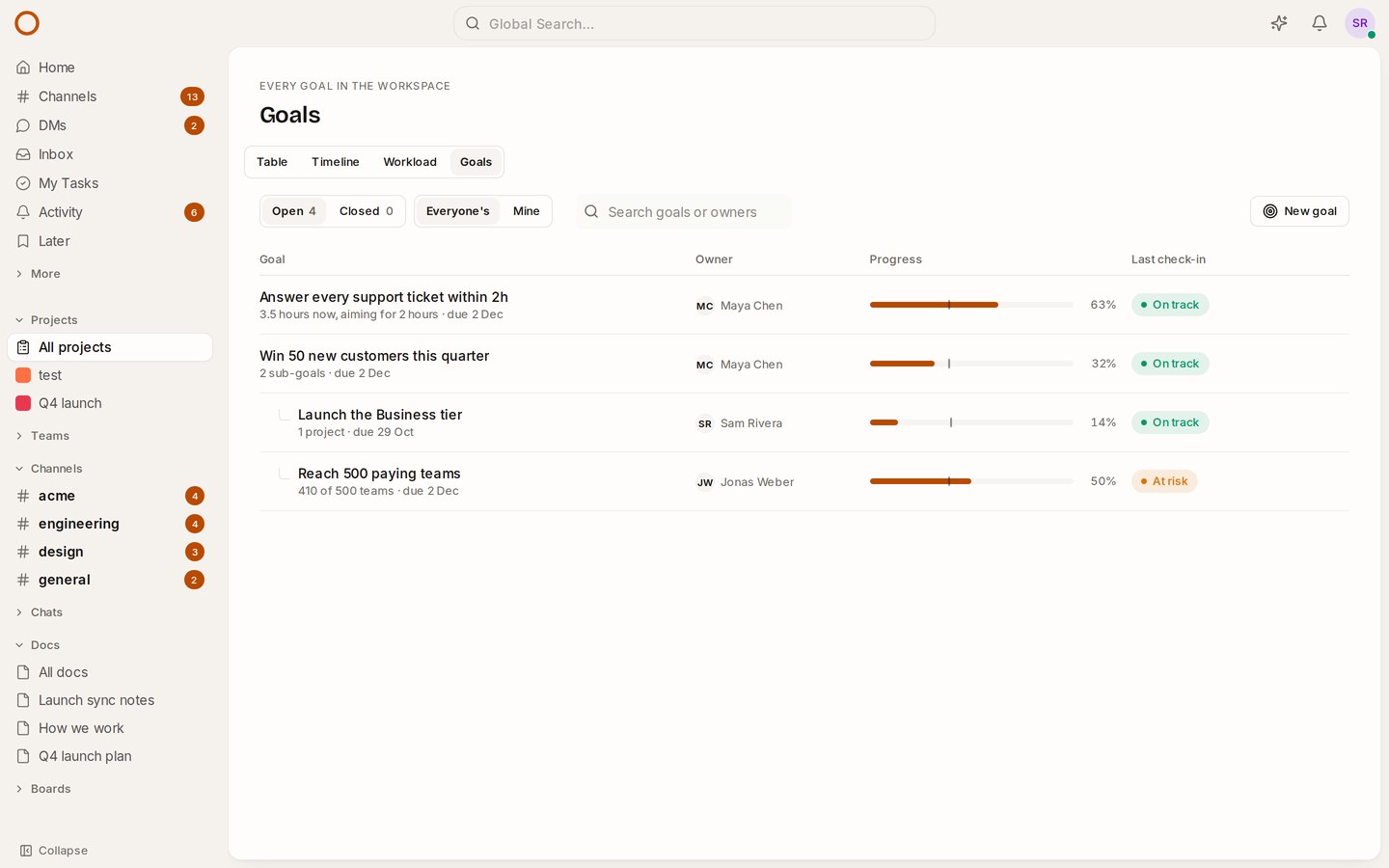
A goal is an outcome your team is after by a date: launch the Business tier, reach 500 paying teams, answer every support ticket within two hours. It has one owner and a due date. Open Projects and choose Goals, or press Ctrl/⌘ K and choose Go to Goals.
The difference from a spreadsheet of OKRs is that nobody types the progress. You choose where it comes from:
- Its projects. A goal served by projects fills in as their tasks get done. Each project counts the same, whatever its size: one at 75% and one at 25% make 50%.
- Its sub-goals. A company goal can be the average of the team goals under it. Goals nest up to four levels deep.
- A number. Customers, revenue, hours, a score. You set where it started and the target, and move it when you check in. It can count down, too: “first reply from 6 hours to 2” works.
Is it on pace?
Every goal’s progress bar has a small tick: where the goal would be by now if it moved evenly from its start to its due date. A bar that stops short of the tick is behind.
The goal’s page puts that in words (“20 points behind its time”) and lists what serves it. Each project shows how much of its work is done, what’s overdue, and its own last project update. Each sub-goal shows its owner, its progress and its last check-in.
A project’s page also names the goal it serves, so the people doing the work can see why it matters.
Check-ins, drafted for you
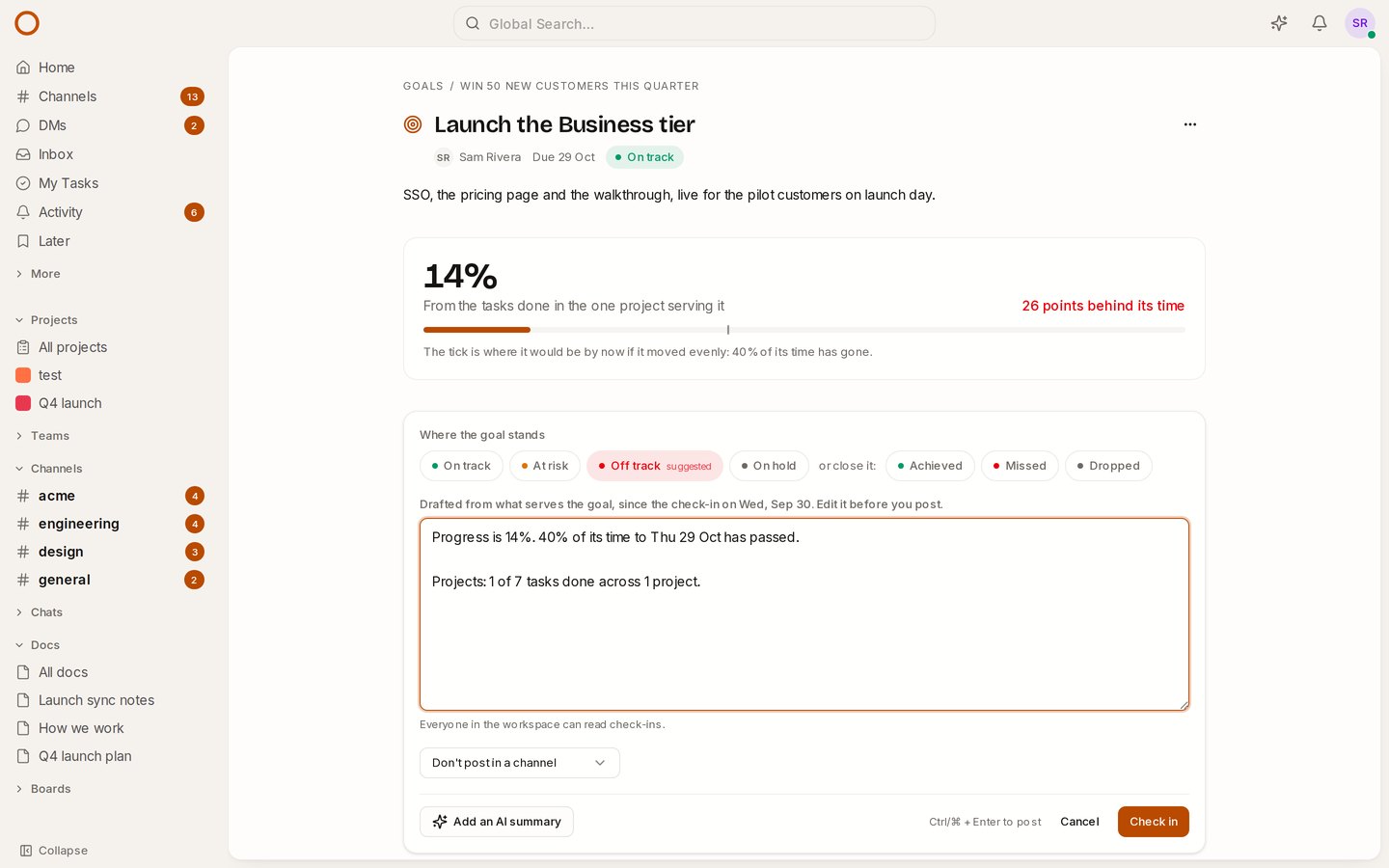
Choose Check in and the note is already written:
- how far the goal moved since the last check-in,
- how much of its time has passed,
- how much of the work in its projects is done, and what’s overdue,
- a line for each sub-goal.
The draft sums the projects up without naming them. Everyone in the workspace reads check-ins, and a project’s name belongs to the people in it. You can still name them yourself.
OneCamp suggests a health from the pace: within ten points of where it should be is on track, within twenty-five is at risk, and further behind is off track. In the picture, the last check-in said on track, but the goal is 14% done with 40% of its time gone, so the suggestion is off track. Edit anything, then post. You can send it to a channel at the same time.
For a number goal, the check-in is also where you move the number. On the AI edition, Add an AI summary puts two or three sentences on top, written only from those facts.
When it’s over, close it from the same place: Achieved, Missed or Dropped. A closed goal keeps the progress it ended at, and can be reopened if it closed too early.
Who sees what
- Everyone in the workspace sees every goal. Guests and clients never do.
- The goal’s owner, whoever made it and workspace admins can change it.
- Putting a goal under another one changes that goal’s progress, so you also need to be able to change the other goal.
- A project you aren’t in still counts towards a goal, but its name isn’t shown to you: the page only says how many there are.
How it compares
In Asana, goals are on the Advanced plan, priced per seat. In OneCamp they’re in every edition, including the free one for up to 25 people, on your own server. The Asana comparison now lists what Asana still does better, and what moved.
Try it
- Open the goals in the live demo. The demo has a quarter’s goal with two goals under it. Open Launch the Business tier, which is yours in the demo, and check in.
- On your own server: onemana.dev/free gives you the install command, no email needed.
- The guide: Goals.
- Already running OneCamp? Update to the latest release, with AI or without.