
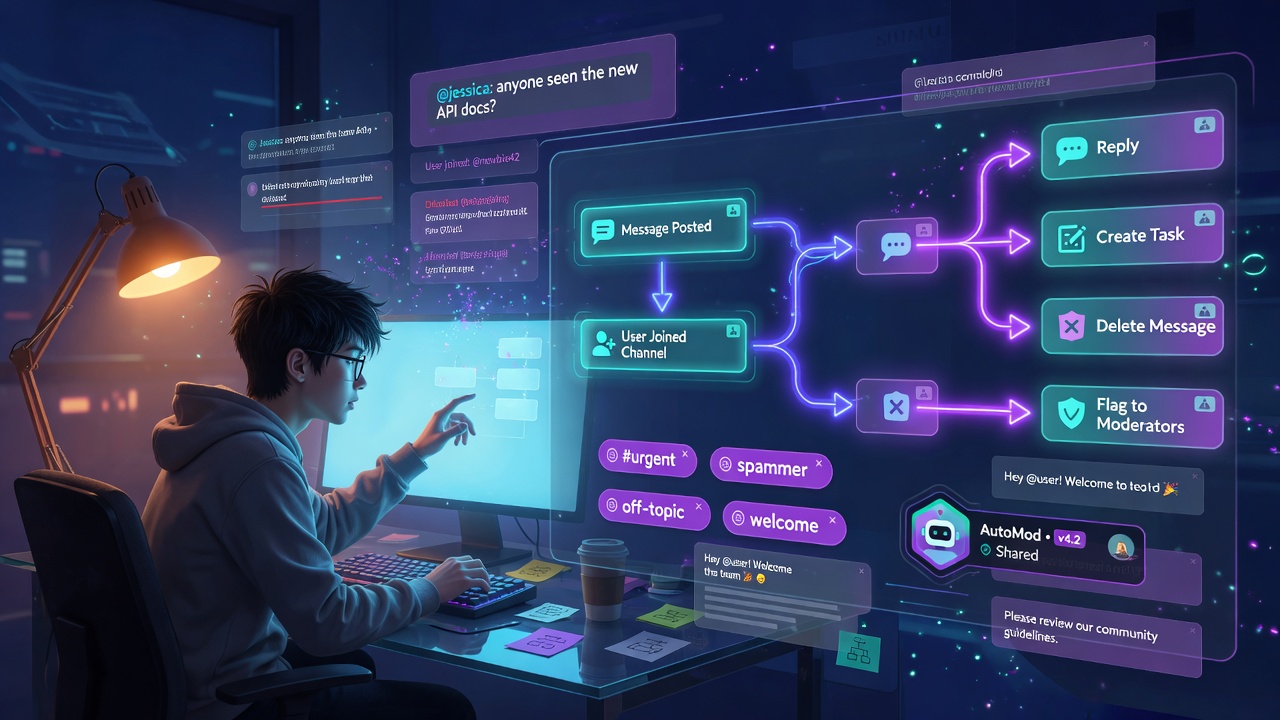
Every team, once it grows past a certain size, wants the same handful of small automations.
When someone joins the #welcome channel, greet them and point them to the docs. When a message in #support contains the word “refund,” quietly create a task. When someone posts something that breaks the rules, flag it to the moderators. None of these are hard ideas. They’re the connective tissue that makes a busy workspace feel organized instead of chaotic.
The trouble is how most tools deliver this. You end up wiring a third-party automation service, or running a bot, or standing up a separate workflow engine with its own queue and its own way of doing permissions — a whole second system bolted to the side of your chat app. More moving parts, more places for things to break, and a new surface to worry about: what exactly can this automation do, and on whose authority?
So when I built the Workflow Builder for OneCamp, I started from a constraint instead of a feature list. The constraint turned out to be the most important design decision in the whole thing.
The Constraint: A Workflow Is a Rule, Not a Runtime 🧱
The note I left at the top of the engine says it best:
A workflow is a saved rule, NOT a new runtime. Triggers ride the existing workspace event bus, and actions reuse the proven AI executors, which already re-check the acting user’s permissions. So a workflow can never do something its owner couldn’t do by hand, and we add no parallel delivery/queue machinery.
Let me unpack why both halves of that matter.
No new runtime. OneCamp already has an internal event bus — “a post was created,” “a user joined a channel.” Workflows just listen to events that already flow through the system. And the actions a workflow takes (post a message, create a task) reuse the exact same executors the AI assistant uses, which already do permission checks. There’s no separate worker pool, no second queue, no parallel delivery path. Less code, fewer failure modes, nothing new to operate.
Can’t exceed its owner. This is the security spine. A workflow runs as the person who created it. If you couldn’t delete a message in a channel by hand, a workflow you create can’t either. Automation in OneCamp can never become a privilege-escalation backdoor, because it’s mechanically incapable of doing something its owner lacks the rights to do.
What You Can Actually Build 🛠️
Workflows are “when this happens, do that.” Today the engine actively listens for two triggers:
- A message is posted (optionally filtered to a channel, and to keyword matches)
- A user joins a channel
And the things they can do:
- Reply — post a public message back into the channel
- Reply privately (ephemeral) — a card only the target person sees
- Create a task — turn a message into a tracked task in a project
- Delete message, Warn user, Flag to a review channel — lightweight moderation
Stitch those together and you get the classics. Welcome bot: on user-joined, reply “Welcome {user}! Start with the pinned onboarding doc.” Support triage: on a message containing “bug” or “broken” in #support, create a task in the engineering project. Tidy moderation: on a banned keyword, delete the message and send the author a private warning explaining why.
Keyword matching uses word boundaries (so “class” doesn’t trip on “classic”), and you choose whether any keyword or all of them must match. Reply text supports simple {user}, {channel}, and {text} substitutions, so your welcome message can actually say the person’s name.
The Bot Identity Problem 🤖
Here’s a question that sounds trivial and isn’t: when a workflow posts a welcome message, who sent it?
If it posts as the admin who created the rule, that’s confusing and a little creepy — members see a human’s name on a message that human never typed. If it posts as a generic bot account, you’re back to the data-leak problem I keep running into: a bot with access to everything is a liability.
OneCamp’s answer is a single shared automation identity — one synthetic “OneCamp Automation” user that can’t log in, is hidden from member pickers, and is the visible author of automated posts. But each workflow badges its messages with its own label (a welcome workflow can call itself “Welcome Bot”), so members see a recognizable, honest automation identity rather than a person or an anonymous black box. The same identity backs incoming webhooks, so all of OneCamp’s automated posts speak with one consistent voice.
Loops, Caps, and the Other Boring Things That Matter 🔁
The unglamorous safety work is what separates a toy from something you’d trust in a real workspace.
Infinite loops. A “reply” action posts a message. A posted message is an event. That event could trigger the workflow again, which replies again, forever. OneCamp closes this off cleanly: workflow actions run under a context flag that tells the event dispatcher to skip in-process listeners for those writes. A workflow’s reply simply cannot re-trigger a workflow.
// Loop safety: actions run under helpers.WithWorkflowGenerated(ctx); the
// event dispatcher skips in-process listeners for such writes, so a "reply"
// action can't trigger another workflow forever.
Blast radius. Each workflow is capped at 5 actions per trigger, so a misconfigured rule can’t fan out into unbounded work. One bad workflow can’t take the system down with it.
Speed. Active workflows are compiled once — keywords pre-built into regexes — and cached in memory, keyed by trigger type. When a message is posted, the engine only consults the workflows that asked about messages, not every rule in the workspace. The hot path stays cheap. Edit a workflow and the cache rebuilds instantly, no restart.
Moderation that re-checks at execution time. This is the one I want to highlight. A delete_message action doesn’t just trust that the workflow exists — at the moment it fires, it re-verifies that the workflow’s owner is still a moderator of that channel. Demote someone, and their moderation workflows stop being able to delete, immediately. The permission isn’t baked in when the rule is saved; it’s checked every single time the rule runs.
Who Gets to Build Them? 👥
In a lot of tools, automation is admin-only. I think that’s both too restrictive and the wrong question. The right question is: what can this automation do, and is that bounded? Because workflows can never exceed their creator’s own permissions, it’s safe to let members build their own — a team lead can set up a welcome message for their channel without filing a ticket with IT.
What members can’t do is the genuinely dangerous stuff. Managing apps (which can call out to external URLs) and webhooks (which exfiltrate workspace events) stay firmly admin-only. I drew that line deliberately: delegate the safe, bounded automation freely; keep the things with real external blast radius locked down. Enterprise-grade isn’t “lock everything,” it’s “know exactly where the sharp edges are.”
Where to Find It 🗺️
Workflows live in settings — admins manage all of them, members manage their own. You pick a trigger, add a keyword filter if you want one, choose your actions, and give your bot a name. It’s active the moment you save.
And like everything in OneCamp, it runs entirely on your server. No third-party automation platform with read access to your messages, no external service holding the keys to your workspace events. The rules live in your database; the actions run in your backend; the data never leaves.
That’s the whole philosophy in miniature — give teams the power they actually want, without quietly handing a SaaS vendor a window into everything they say.
OneCamp is available as a self-hosted lifetime purchase at onemana.dev — one payment, unlimited users, your server.
Previous posts: The AI That Sits In Your Calls · AI Nudges: A Workspace That Remembers What You Promised · Slash Command App Platform · Building the Anti-SaaS Workspace
Follow on Twitter for more updates.