
If you’re new here: OneCamp is a self-hosted workspace (chat, tasks, docs, calls, calendar and AI agents) that you install on your own server. It is open source and free for up to 25 people.
Most teams have a version of the daily standup. Either it’s a meeting that takes fifteen minutes of everyone’s morning, or it’s a bot added to the chat app, often billed per person, that asks the question for you. Basecamp has had a better idea for years, its automatic check-ins: ask the question on a schedule and keep the answers together.
OneCamp channels can now do the same.
A question on a schedule
In a channel, choose ⋯ at the top right, then Check-ins, and New check-in. Set:
- the question, such as “What did you work on today?”,
- the days it’s asked,
- and the time, in your time zone.
You can start from a suggestion too: “Is anything blocking you?” every weekday at 10:00, or “What will you work on this week?” on Mondays at 09:30.
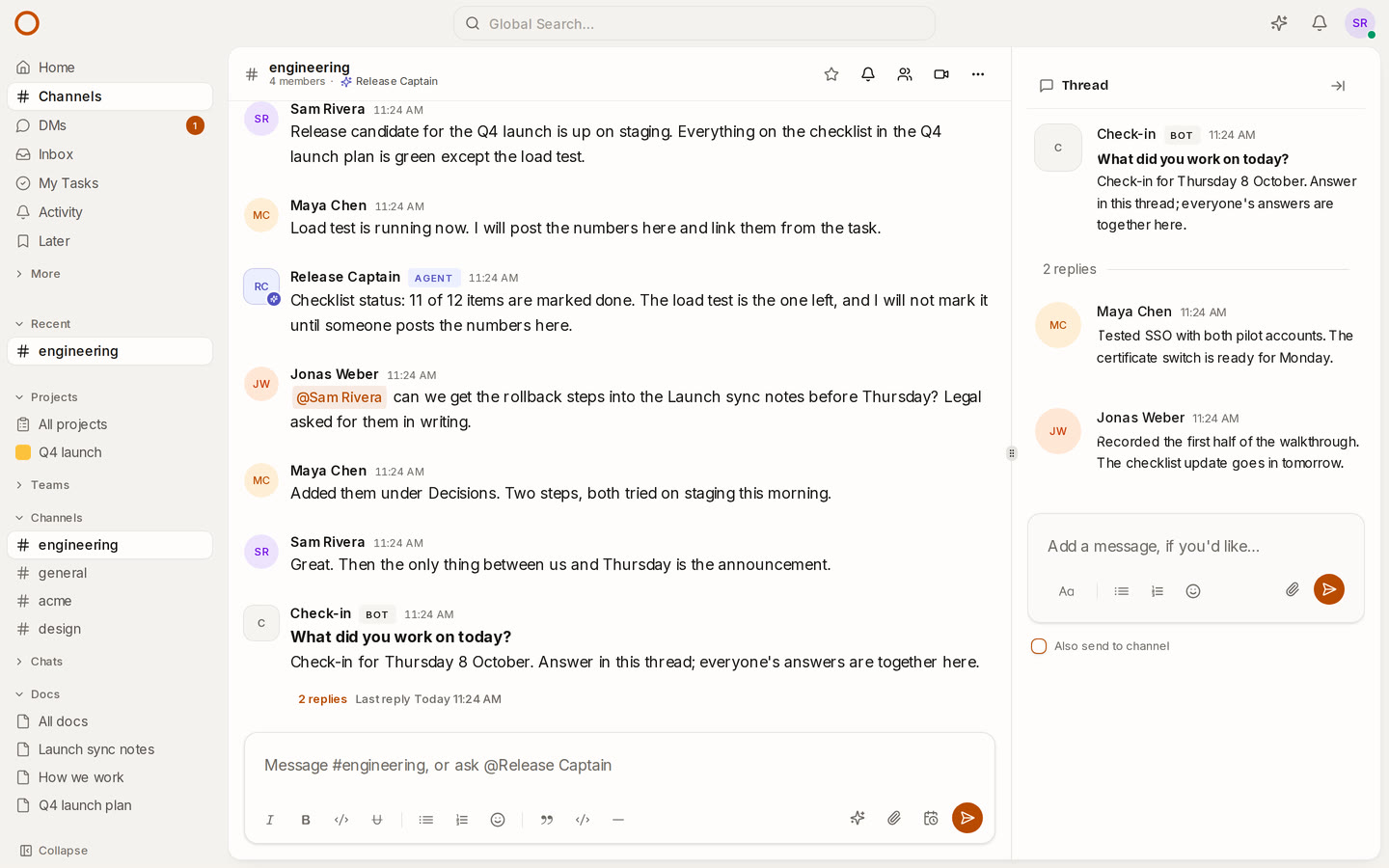
On each of those days, the Check-in bot posts the question in the channel. Everyone in the channel is notified, and people who are away get an email. They answer in the question’s thread, so a day’s answers sit together and the channel shows a single line: the question and how many replies it has.
Ask now, pause, change
The channel’s admins see a few controls beside each check-in:
- Ask now posts the question straight away, for a day off the schedule or a new team.
- Edit changes the question, the days or the time.
- Pause stops it during a holiday or a launch week, and Resume picks up at the next time.
- Delete removes it. The questions and answers already posted stay in the channel.
Asked once, on time
A scheduled question is the kind of feature that’s easy to get almost right. These are the cases we tested:
- One ask, even with several servers. If you run more than one OneCamp worker, each due question is claimed by one of them, so nobody is asked twice.
- Daylight saving. A check-in set for 17:00 is asked at 17:00 local time on both sides of a clock change. When the clocks skip that time, it’s asked at the first minute after.
- No midnight questions. If your server was down at 17:00 and comes back at midnight, that day’s question is skipped instead of asked late. The next one is asked on time.
- Archived channels. When a channel is archived, its check-ins pause themselves.
Bots say what they are
The Check-in bot is a bot, not an AI agent, and it now says so. Every bot in OneCamp used to carry an Agent tag and the agent’s sparkle, and screen readers announced each one as an “AI agent”. That included the Slack bridge, the channel-guest relay and, in the edition without AI, the automation account.
Now only the workspace assistant and the agents you set up are tagged Agent. Everything else is tagged Bot, in neutral grey, and a screen reader hears “Automated account”. “Is this a person, an AI, or a script?” is a fair question to ask about any name in a chat, and the label should answer it correctly.
How it compares
- Basecamp has automatic check-ins in every project, billed with the rest of Basecamp. OneCamp’s check-ins live in a channel, on your own server, and are in every edition, including the free one for up to 25 people.
- Slack can post a scheduled standup reminder with a Workflow Builder template, on its paid plans. For more than a reminder, teams add a bot from the app directory, such as Geekbot, whose standups are billed per participant. OneCamp’s check-ins are in every edition, including the free one, and the question, the answers and the work they’re about stay in one app on your server.
Try it
- Open the live demo and go to #engineering. Today’s “What did you work on today?” is there, with Maya’s and Jonas’s answers in the thread. Choose ⋯, then Check-ins, to see its schedule.
- On your own server: onemana.dev/free gives you the install command, no email needed.
- The guide: Check-ins.
- Already running OneCamp? Update to the latest release, with AI or without.