
If you’re new here: OneCamp is a self-hosted workspace (chat, tasks, docs, calls, calendar and AI agents) that you install on your own server. It is open source.
Ask anyone who runs a small agency where their clients are, and the answer is “everywhere”. The brief came by email. The follow-up came over WhatsApp. The bug report is in a shared spreadsheet. The kickoff call took eleven messages to schedule. The team’s own work sits in one tool, and the people the work is for are in four others.
This release is about bringing the client in without giving them the keys to the workspace.
A channel for the client, opened from a link
A channel admin can now make a guest link for one channel. The client opens it, types their name, and reads the channel and its threads. If you allow it, they post and reply too.
They have no account. The link opens that one channel and nothing else: not your other channels, not your other clients, not people’s profiles, not search, not files. What they write shows up in the channel marked as a guest’s, as plain text. You can give the link an end date or leave it open, and turn it off at any time.
This is the part of Slack Connect that agencies actually use, without asking your client to sign up for anything. It is tested end to end with two channels and two links, to prove that each link only ever sees its own channel. How channel guests work.
Requests arrive as tasks
A project can now have intake forms: briefs, change requests, bug reports. You share the form’s link, and every answer becomes a task in that project, with all the answers in it. The person filling it in needs no account.
When the project is archived, its forms stop taking answers. When the form’s owner leaves the workspace, it closes too, so an old link can’t keep dropping work into a board nobody watches. Intake forms.
Kickoffs without the back-and-forth
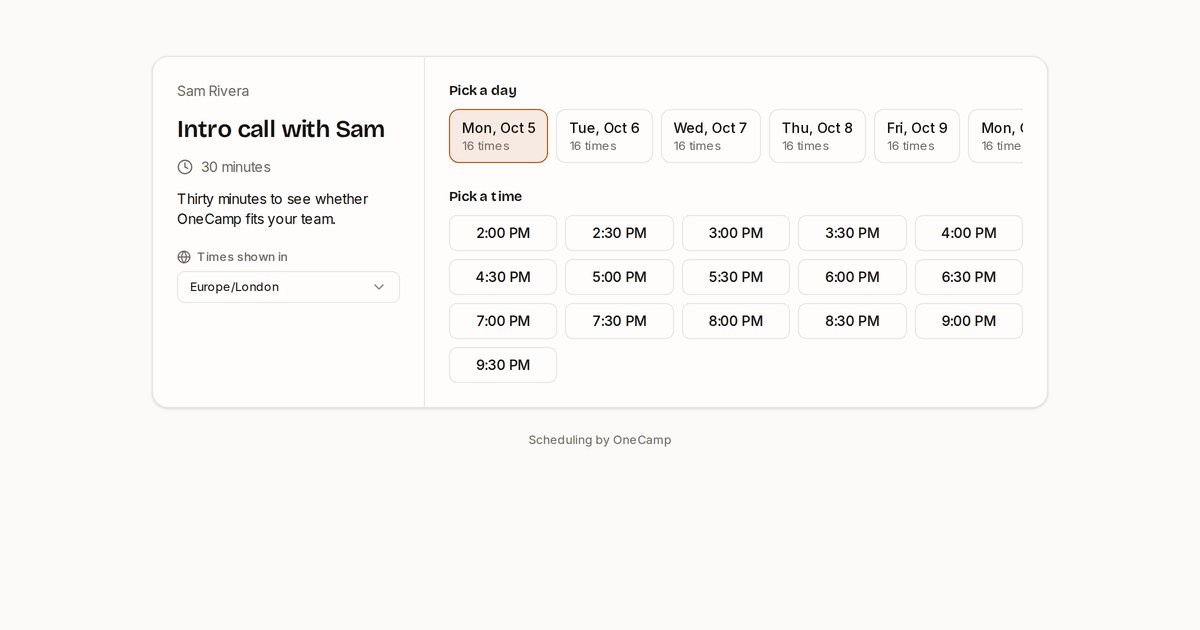
A booking page shows only your free time, in the visitor’s time zone, and puts the call on your OneCamp calendar (and on your Google Calendar, if you’ve connected it). The cover image of this post is the one in our demo workspace, and you can open it yourself. Booking pages.
The work in between
Agency work comes in sprints and in repeats, and the last few releases cover both:
- Cycles: sprints of one to four weeks for a project; when one ends, its unfinished tasks carry into the next. Cycles.
- Repeating tasks: the monthly report and the weekly status update create themselves when the last one is done. Recurring tasks.
- Workshops on the whiteboard: a timer, dot voting, and everyone’s view following whoever presents. Board facilitation.
- Pause notifications when you’re with a client, and a teammate can still reach you once a day if it really can’t wait. Pause notifications.
No seat tax on contractors
Agencies grow and shrink with their projects. A per-seat bill punishes you for adding the freelance designer for three weeks. OneCamp is free for up to 25 people on your own server. Past that, a lifetime licence covers everyone on the server for a one-off ₹24,999, or we run it for you on Cloud.
Getting started no longer needs an email either. onemana.dev/free gives you the install command on the spot; paste it into a server and you have a workspace.
Try it in the demo
The live demo now has all of this set up: a project with a running cycle and a “Launch requests” form, the booking page above, and #acme, a channel where two people from a client company talk with the team as guests.
If you run an agency or a studio, here’s the short version. And if something you need with clients is missing, write to [email protected]. I read everything.