
If you’re new here: OneCamp is a self-hosted workspace (chat, tasks, docs, calls, calendar and AI agents) that you install on your own server. It is open source and free for up to 25 people.
Every team tracks something about its work that no tool ships with. A content team wants to know where each piece goes out. An agency wants each deliverable’s budget and whether the client signed it off. An engineering team wants a reviewer on every task. Until now that lived in task titles and tags. Now it gets its own fields.
Fields of your own
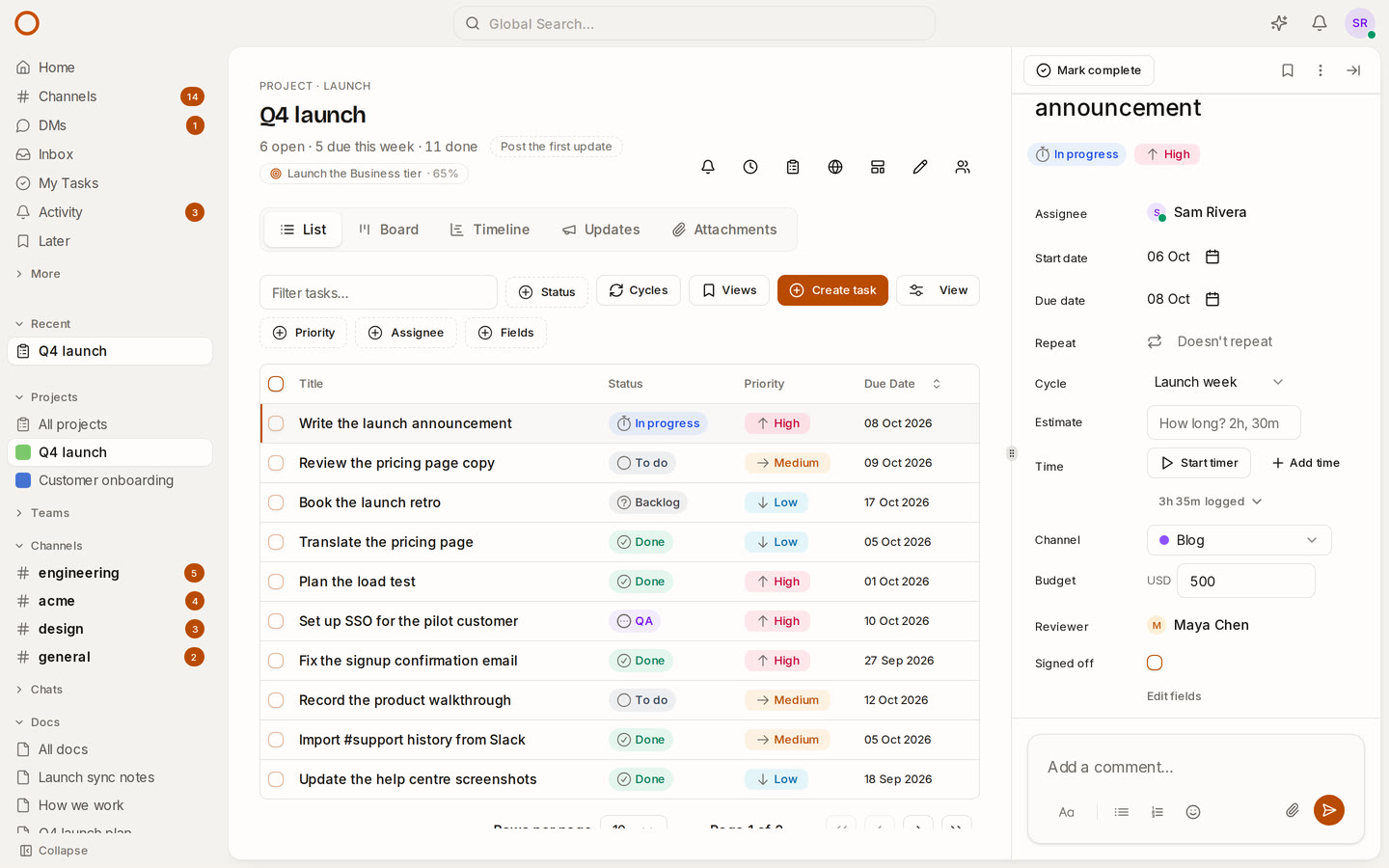
A project’s admins add fields from any task’s panel (Add a field) or from the board’s View menu. There are nine kinds:
- Select and Multi-select: a few options, each in its own colour.
- Text, Number and Link.
- Money: typed as 12,500.50 and kept to the cent, in the field’s currency.
- Date: a day, with no time zone to trip over.
- Person: someone in the workspace.
- Checkbox: yes or no.
Then they show up everywhere the work does:
- In the task’s panel, where you set them. A choice saves as you pick it.
- As columns in the list, which you show or hide from View.
- As a filter. Fields in the list’s toolbar narrows it by a choice, a person or a checkbox, or to the tasks with no value yet (“every task without a reviewer”). Saved views keep the filter.
- On the board’s cards, for the fields you mark On cards.
A value someone sets shows for everyone in the project straight away, and goes into the task’s history. Rename an option and every task has the new name. Take one away and OneCamp asks first, then takes it off the tasks that had it.
Repeating tasks keep their values. Project templates carry a project’s fields, and two built-in templates now come with one: Client approved on the Client project, Channel on the Product launch.
A burndown for every cycle
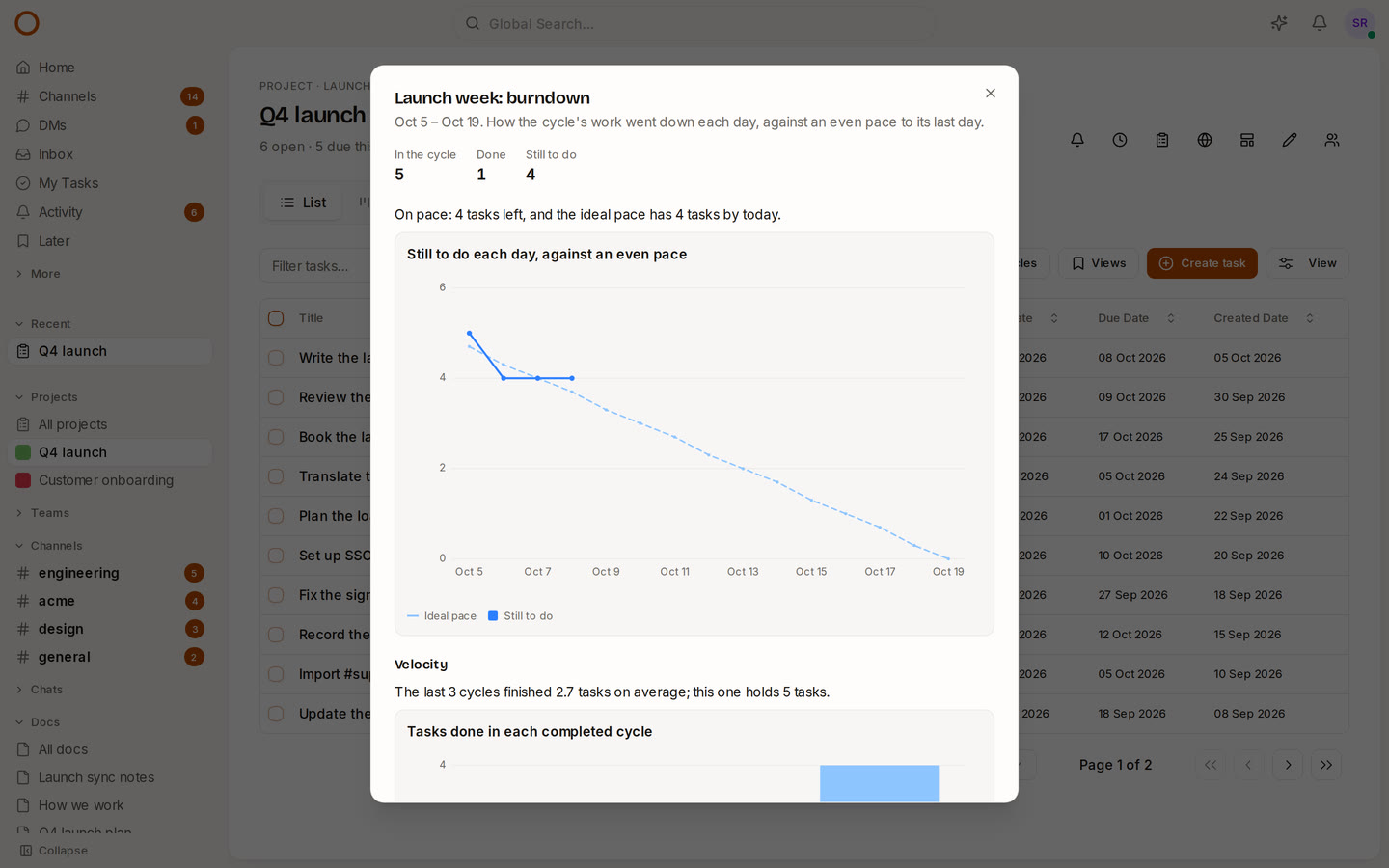
Open Cycles on a project and choose Burndown. You see what was still to do at the end of each day, against an even pace to the cycle’s last day, and a sentence that says whether you’re on pace. If tasks have estimates, switch to hours.
Below it, velocity: what each of the last six completed cycles finished, and how much the current cycle holds against the average of the last three. If the last three finished seven tasks each and this one holds twelve, you know before the cycle starts, not on its last day.
When a cycle is completed, its unfinished tasks move on to the next one, and the chart still ends where the work really stood.
How it compares
- Asana, ClickUp, monday.com, Notion and Jira all have custom fields. Linear and Basecamp don’t.
- Burndown and velocity: Asana and Notion don’t have them, monday.com keeps them in monday dev, ClickUp keeps them for its Business plan, and Linear has burn-up charts but no velocity. Jira has the deepest agile reports.
In OneCamp both are in every edition, the free one for up to 25 people included, on your own server.
Also fixed
Editing a task in a list filtered by cycle, by assignee, by overdue or by one of the project’s own statuses used to drop the task from the list until the next refresh. It now stays where it belongs.
Try it
- Open the live demo: the Q4 launch project has its fields set, and three completed cycles behind the current one.
- On your own server: onemana.dev/free gives you the install command, no email needed.
- The guides: Custom fields and Cycles.
- Already running OneCamp? Update to the latest release, with AI or without.