
If you’re new here: OneCamp is a self-hosted workspace (chat, docs, tasks, projects, calls, boards, tables, an API) that runs on your infrastructure. I build it, sell it, and operate the demo.
The last two posts were about agents. This one is about the part of OneCamp people touch fifty times a day, because that is where I spent the last ten days, and most of what I found there was not flattering.
Six columns for every team on earth
A OneCamp board had Backlog, Todo, In Progress, In Review, Done and Canceled. Those are good defaults. They are also exactly six, and I never offered a seventh.
That is fine until you meet a real team. A support team has Waiting on customer. A design team has Feedback. Almost every engineering team has QA or Blocked. When the tool has no word for your step, the step does not go away: it moves into a label, a naming convention ([QA] Set up SSO), or a column of sticky notes in somebody’s head.
Projects can now have their own statuses. A project admin opens the board, clicks View, then Manage statuses…, and adds them.
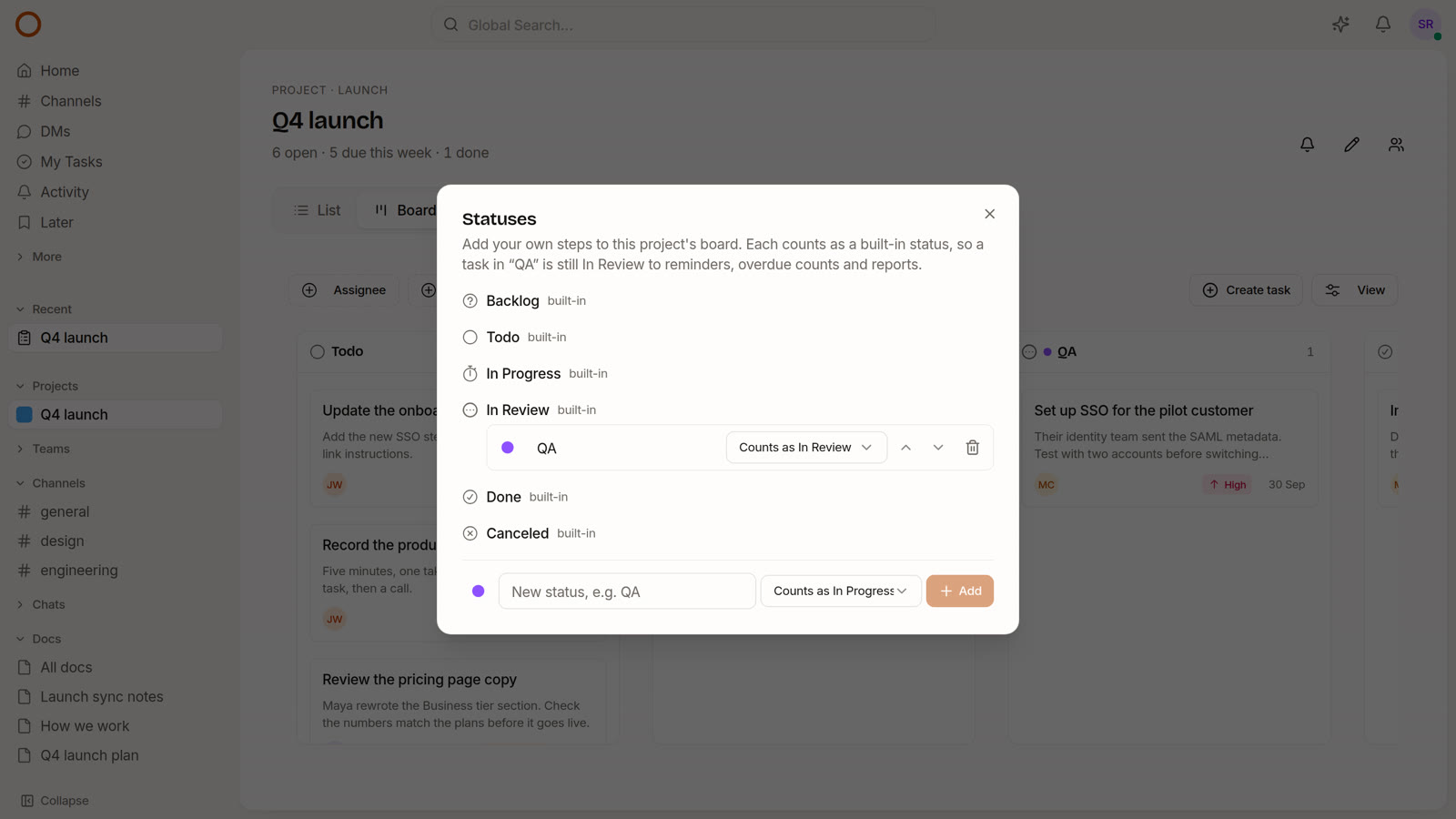
The one design decision worth explaining is the dropdown next to each name: Counts as.
Every custom status belongs to one of the six built-in ones. “QA” counts as In Review; “Blocked” might count as In Progress. That sounds like bookkeeping, and it is the reason the feature is safe to use. Everything in OneCamp that has to understand a status (is this task still open, is it overdue, does it belong in someone’s morning list, what does the project’s progress line say) keeps reading the built-in one. Only the things that show or pick a status read your name. So adding “QA” to a board cannot quietly break a reminder, a report or a count somewhere else.
What you get:
- A column per status on the project’s board, next to the status it counts as, in the order you set. Drag a card into it like any other column.
- Your statuses in every picker: the task panel, the list view’s status column and filter, and the filter drawer on a phone. They sit indented under the status they count as, so the list stays readable.
- Rename, recolour, reorder, or change what it counts as at any time. Renaming “QA” to “Testing” renames it on every task already in it. Changing what it counts as moves those tasks’ underlying status with it.
- Deleting asks where the tasks go. It offers the status it counted as by default, so nothing is lost, but you can pick any other.
- Only project admins can change the list. Every member can use it.
- Up to 20 per project, 40 characters each, and no two with the same name (ignoring case, so “qa” and “QA” are one status).
A few things are deliberately simpler:
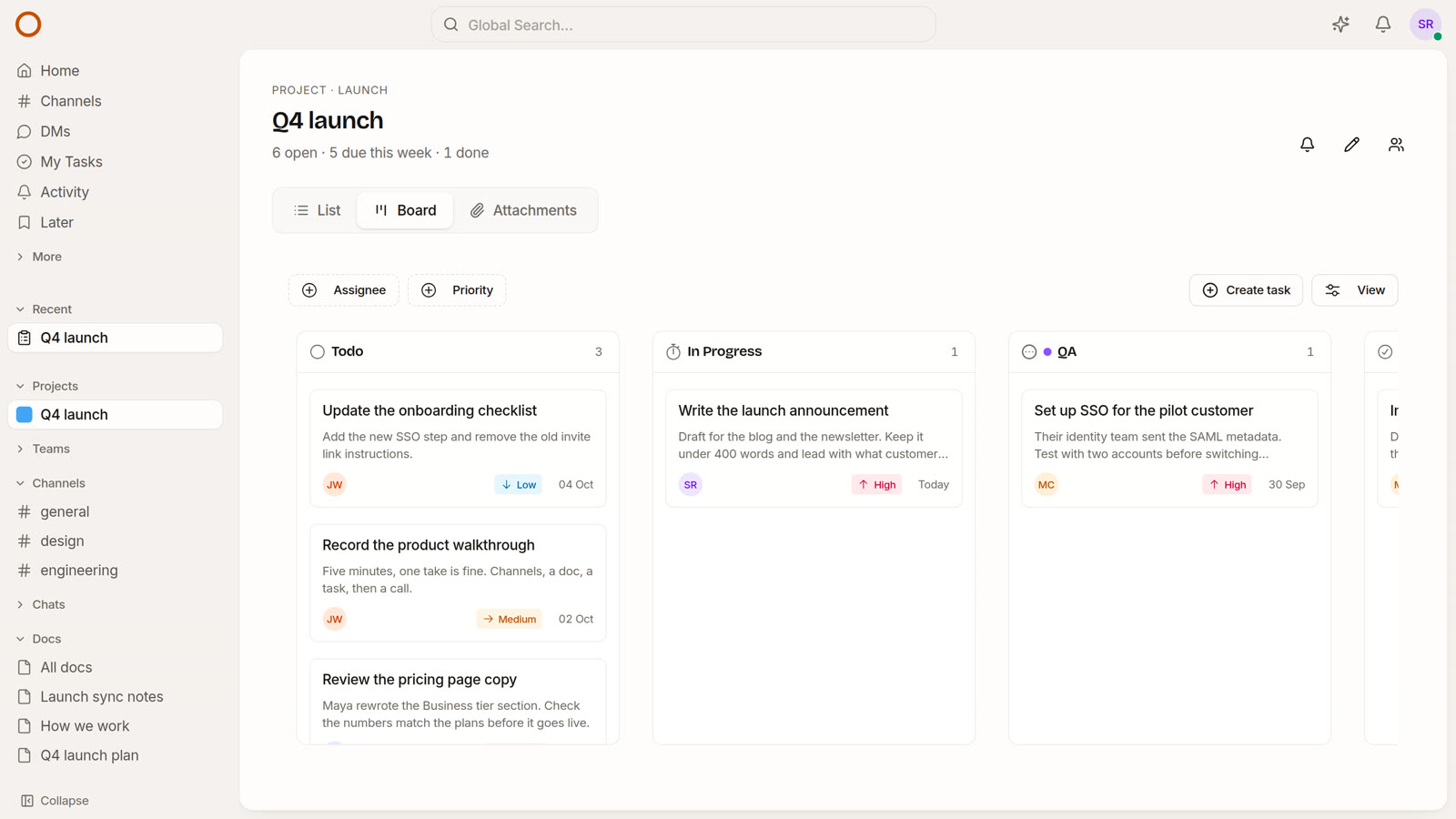
- My Tasks keeps the six built-in columns, because it spans every project and yours are per project. A task in a project’s own status shows it as a small chip on the card, so you can still see “QA” at a glance.
- OneCamp AI understands your names. “Move the SSO task to QA” works, and if you ask for a status the project does not have, it tells you which ones it does.
- GitHub automation rules accept them too, though the settings screen still only offers the built-in ones in its list. That is the next thing I will fix there.
While I was in there I found that GitHub automation rules (“move to Done when the PR merges”) had never actually moved anything. They wrote to a database column that does not exist. They now go through the same path as every other status change, with the activity entry and the notification that come with it.
The card went back to where it started
The reason I was in the board code at all was a complaint I should have caught myself: sometimes dropping a card rearranges the cards.
It was worse than that. Reordering cards inside a column was never saved. And a card moved to another column went back to its creation-date slot the next time the page loaded. The board looked like it listened, then quietly undid you.
Now a drop is sent with the card above and the card below it, and the server keeps the place. Letting go of a card where it started sends nothing at all.
The same week I got a second report: dragging feels choppy, and sometimes it ends on “Something went wrong”. Both were real. With the pointer in the gap between two columns, the library underneath could name one column, then the other once the card had moved, then the first again, until React gave up and threw. And every column crossing re-measured every card in both columns.
I rewrote the board around the pattern Jira uses: while you drag, only the card you are holding moves, and a line shows where it will land. On a 40-card board with the CPU slowed six times, two drags went from 32 long frames and 7.9 seconds of stall to 3 long frames and 0.36 seconds. It is a steady 60 frames a second while moving. It can no longer end on an error screen.
Smaller things that came with it:
- Columns remember which ones you hid under View, per board.
- Each column shows its count, and an empty one says what to do.
- Cards cannot be dragged where you cannot move them, instead of moving and snapping back.
- The priority filter on the My Tasks board did nothing. It was never sent. It is now.
Messages drawn on top of each other
This one arrived as a screenshot today: two messages in a DM, printed over each other like a misfed photocopier.
The chat list only draws the messages on screen, and it remembers how tall each row was by its position in the list. When older messages load above, it has a mode that shifts those remembered heights down along with the rows. That mode was switched on for one second whenever OneCamp asked for older messages, whatever actually happened in that second. If a new message arrived at the bottom inside that window, every row took the height of the row above it, and since no row had moved, nothing measured again.
The daily note from OneCamp AI arrives right as its DM opens, which made it the most reliable way to hit this. The list now decides from the change itself: rows added or removed at the top shift, anything else does not. It applies to DMs, group chats and channels alike.
Save for later
There was no way to say not now, but don’t let me forget. So there is now a bookmark on messages (in the hover toolbar, or the long-press menu on a phone), on the task panel and on docs.
Saving puts the item in Later, a page of its own in the sidebar, with a one-click reminder: in an hour, this evening, tomorrow morning, next week, or a date you choose. When a reminder comes due, the item moves to the top of Later, any open tab shows a toast with an Open button, and a push notification opens the item itself if OneCamp is closed. Ticking something done keeps it under Done, so a mistaken tick can be put back.
Calmer, in a lot of small ways
None of these are features on their own. Together they are most of the difference between a tool you tolerate and one you do not notice.
- A project says where it stands. Under its name, one line: how many tasks are open, overdue, due this week and done. It updates the moment a card moves.
- Activity has four tabs, not six. Priority, All, Mentions, and (in the AI edition) AI. Comments and Reactions were tabs of their own, although everything in them was already in All.
- Browser tabs say which page they are. Every tab used to be titled “OneCamp”. Now it is “#design”, “Launch sync notes” or “Maya Chen”, with a count of what is unread.
- The top bar has fewer controls. The connection dot shows only when the connection is down. The theme switch moved into your avatar menu. A channel’s header keeps favourite, notifications, members and call, with the rest under More.
- Solid surfaces instead of blur. The frosted-glass panels looked nice and cost a repaint on every keystroke and scroll on modest laptops. They are solid now, and typing stays smooth.
- Archived projects leave. Archiving a project now removes it from the sidebar, and its tasks leave My Tasks and your attention list, which they did not before.
- Due times are in your time zone. A task says when it is due once, in the reader’s own zone, everywhere it appears.
- Phones got a lot of fixes. The project task list showed two tasks of seven, and a project’s channel list sat in a 160-pixel window. The calendar opens on an agenda of the days that matter. My Tasks no longer crashes.
- A shared doc has one source, so its content can no longer appear twice.
For the people who run the server
Two things that matter only if you are the admin, and matter a lot then:
- Archive policies can now remove files and recordings for good, after a number of days you choose. Archiving used to keep every byte forever on a machine you were told was yours. While building it I found the recordings policy had archived nothing since it was written: its query asked for a block by the wrong name and got an empty list, with no error.
- Moving a workspace to another machine is three commands:
make app-stopon the old one, thenmake move-in FROM=<backup>on the new one (andmake app-startif you call it off). The new machine adopts the old one’s keys first, because the keys that decrypt what is in the database have to be the ones it was written with.
Try it
The demo has a project called Q4 launch with a QA column already on its board. Open the board, drag the SSO card around, then open View, Manage statuses… and add one of your own: you are an admin of that project, and the demo resets every night. On your own install, update to the latest release and every project starts with the six built-in statuses, exactly as before, until an admin adds one.
If there is a step your team has that you would like to see as a default, or a place where OneCamp still makes you think about the tool instead of the work, tell me. The last ten days were almost entirely built from reports like that.