
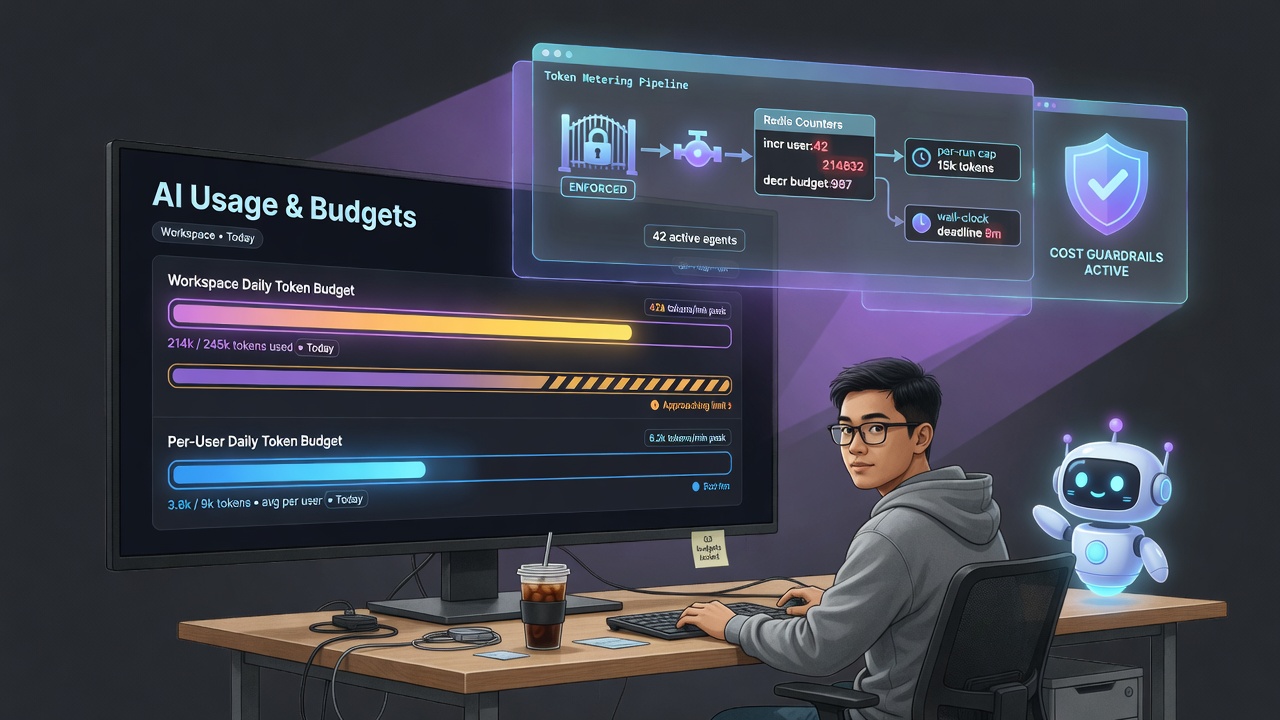
The moment a workspace has AI agents, an AI assistant, AI that draws diagrams, and AI that builds tables, it also has a new way to spend money (or, on a self-hosted model server, to saturate a GPU): tokens. One enthusiastic agent in a retry loop, or one curious user pasting a novel into the assistant fifty times, and your “free” AI has a bill or a melted box.
OneCamp had per-minute rate limiting and a circuit breaker, which stop bursts and outages. They do not stop slow, steady, expensive use. So I added a real budget. This post is how, and why the boring decisions are the important ones.
Meter At One Place, Or You Will Miss Something 🎯
The first instinct is to add token counting to each feature: the agent runner, the assistant, the board generator, the table builder. That is how you end up with four half-correct meters and a feature you forgot.
Every one of those features ultimately calls one of two methods on a model provider: Chat (request/response) or ChatStream (streaming). That is the chokepoint. Meter and gate there, and every AI caller is covered for free, forever, including the next feature nobody has written yet.
So the budget lives in the provider layer. Before a call, it asks “are we over budget?”; after a call, it records what was spent. The assistant, agents, board AI, tables, automations, all of it flows through the same gate without a line of per-feature code.
Two Tiers, Because One Is Not Enough 🪜
A single workspace-wide cap protects the total spend, but it lets one person burn the whole thing before lunch. A single per-user cap protects fairness, but lets a 500-person workspace spend 500× what you intended. You need both:
- Workspace daily cap — total tokens across everyone, per UTC day.
- Per-user daily cap — tokens for each individual, per UTC day.
A call is refused if either cap is already reached. Every completion increments both meters. Both are just counters in Redis, keyed by day (and by user for the per-user one) with a 24-hour TTL, so they roll over at midnight UTC and clean themselves up:
ai:tokens:budget:<YYYYMMDD>            -> workspace total
ai:tokens:user:<userId>:<YYYYMMDD>     -> per-user total
The increment is a single INCRBY that pins the TTL on first write. No cron, no reset job, no row to garbage-collect.
Whose Budget Is This Call? 🧾
The provider’s Chat method takes messages and options, not a user. So how does the chokepoint know whom to charge?
From context. For a normal request, the authenticated user is already on the request context (the auth middleware put it there), so the meter reads it from there with zero changes at the call sites. For a background agent run, there is no request user, so the runner explicitly tags the context with the agent’s owner. Either way, by the time a call reaches the provider, the context knows who to attribute the spend to; if it genuinely can’t tell (a rare internal job), only the workspace cap applies.
Counting Tokens You Can’t Always See 🔢
Recording spend needs a token count, and the provider interface only returned text. Rather than break that interface, the count rides a small usage sink on the context: providers report each call’s input/output tokens into it, and the meter reads them out. When no sink is attached (most callers), reporting is a no-op, so nothing changed for code that doesn’t care.
- For non-streaming calls, every provider (Anthropic, OpenAI, Ollama) returns exact usage, so the meter is exact.
- For streaming calls, exact usage arrives only at the end, if at all. OpenAI sends a final usage frame, Ollama sends eval counts on the done message; for those we use the exact numbers. When a provider sends nothing, we fall back to OneCamp’s existing calibrated token estimator over the prompt and the accumulated output. Estimated is good enough for a budget; the alternative (not metering streaming at all) is the actual bug.
Cost in dollars is computed too, from a small price table, but only for reporting. Enforcement gates on raw token counts, which are provider-agnostic and always available, never on a USD figure that drifts with pricing and is meaningless for a local model.
Agents Get Two More Guardrails 🤖
A budget is a workspace-level safety net. An autonomous agent loop needs tighter, per-run bounds so a single run can’t be pathological:
- A per-run token cap: once a run’s metered tokens cross a ceiling, it stops cleanly and keeps its progress, rather than looping forever.
- A wall-clock deadline: a
context.WithTimeoutaround the whole run, so a slow model or a stuck tool can never pin a worker. Hitting it is reported as “reached the run time limit”, not a crash.
These sit on top of the workspace and per-user caps, the existing step limit, the per-minute rate limit, and the circuit breaker. Defense in depth, each layer cheap.
Fail Open, On Purpose 🚪
Here is the decision that separates a budget that helps from one that hurts: what happens when Redis is down?
OneCamp fails open. If the meter can’t be read, the call proceeds. For a collaboration product, availability beats hard cost-capping: a Redis blip should never take everyone’s AI offline. The per-run agent cap and the per-call MaxTokens remain as backstops even when the workspace meter is unreachable, so “fail open” is bounded, not unbounded.
There is one honest tradeoff I did not paper over: metering happens after a call returns, so under heavy concurrency the cap can overshoot by roughly one in-flight call’s worth of tokens before it trips. On a daily budget of tens of thousands of tokens that is a rounding error, and the alternative (a reserve-then-reconcile protocol with refunds and streaming edge cases) is a lot of fragile machinery to eliminate a negligible, bounded slip. I chose the simple, reliable version and wrote down why.
Two more small correctness details: a budget block returns a friendly message (“you’ve reached your daily AI usage limit”), and it is treated as neutral by the circuit breaker, a budget stop is not a provider failure, so it must not count toward tripping the breaker the way a real outage does.
Limits You Can Change Without A Redeploy 🎛️
Caps started as environment variables, which means changing one is a redeploy. That is fine for a default, wrong for a knob an admin should turn. So the limits live in the database alongside the rest of the AI config and hot-reload: an admin sets the workspace and per-user caps in the AI panel, and the next request honours them. The env vars remain as a boot-time default until an admin sets a value (0 = unlimited everywhere, so existing installs are unchanged).
The same panel shows today’s usage, workspace and personal, against the caps, read from a small GET /ai/usage, so the budget is visible rather than a silent gate someone hits with no explanation.
Why This Matters For Self-Hosted 🏠
On a hosted AI product, the vendor owns the cost ceiling. On a workspace you host yourself, you own it, which means you also own the runaway. Giving an admin a real, two-tier, hot-editable token budget, enforced at the one place every AI feature passes through and visible in the panel, is what turns “we have AI features” into “we can safely let the whole team use AI features.”
It is not the flashiest thing I shipped this month. It is the one that makes all the flashy things safe to leave switched on.
How To Use It 🚀
Set the caps. As an admin, open Admin → AI Models. Under the AI usage section you will find two fields:
- Workspace daily token budget — the total across everyone, per day.
- Per-user daily token budget — the cap for each individual, per day.
Enter a number of tokens and save. Changes take effect on the next AI call, no redeploy. Leave a field at 0 to mean unlimited (the default, so nothing changes until you opt in).
Pick sensible starting numbers. Tokens are roughly ¾ of a word in and out combined. A heavy assistant user might run tens of thousands of tokens a day; an agent doing real work can use more. A reasonable first pass is a per-user cap that comfortably covers a busy day (say 100k–300k) and a workspace cap a few multiples above your active-user count times that. Watch the usage panel for a week and tighten.
Watch consumption. The same panel shows today’s usage, both workspace-wide and your own, against the caps, with a progress bar that turns amber as you approach the limit. It resets at 00:00 UTC.
What your team sees when a cap is hit. The AI politely declines with “you’ve reached your daily AI usage limit” (or the workspace equivalent) instead of erroring out, and normal service resumes after the daily reset, or as soon as you raise the cap.
Tune the agent guardrails (optional). The per-run token cap and the run wall-clock deadline have sane defaults and are adjustable via environment variables (AI_AGENT_MAX_RUN_TOKENS, AI_AGENT_RUN_TIMEOUT_SECONDS) for self-hosters who want tighter or looser bounds. For cost estimates on local/unknown models you can set per-1k-token prices (AI_DEFAULT_INPUT_PRICE_PER_1K, AI_DEFAULT_OUTPUT_PRICE_PER_1K); enforcement still gates on raw tokens regardless.
OneCamp is an open-source, self-hosted, AI-era workspace: chat, docs, tasks, projects, calls, boards, tables, an AI coworker, and AI you can actually put a budget on, all on your own infrastructure.