
The last few posts have walked one line: OneCamp’s AI went from a chatbot that answers, to a teammate with a place in your channels, to one with governance you can audit, to one with senses and skills, and last week to one that writes code and opens a pull request.
Every one of those was about making the teammate more capable in place. This stretch was about something adjacent: reach. A good teammate isn’t just skilled, they can get to the things the work actually lives in, the production database, the PDF someone dropped in the thread, the spec in a Word doc, the repo that isn’t the “main” one. So the last two weeks were about letting the agent reach your whole workspace, and the systems around it, without any of it leaving your infrastructure.
Here’s what landed, and an honest read on what’s solid and what’s still earning its stripes.
Your Real Databases, Answered Read-Only, Through a Plan You Can Read 🗄️
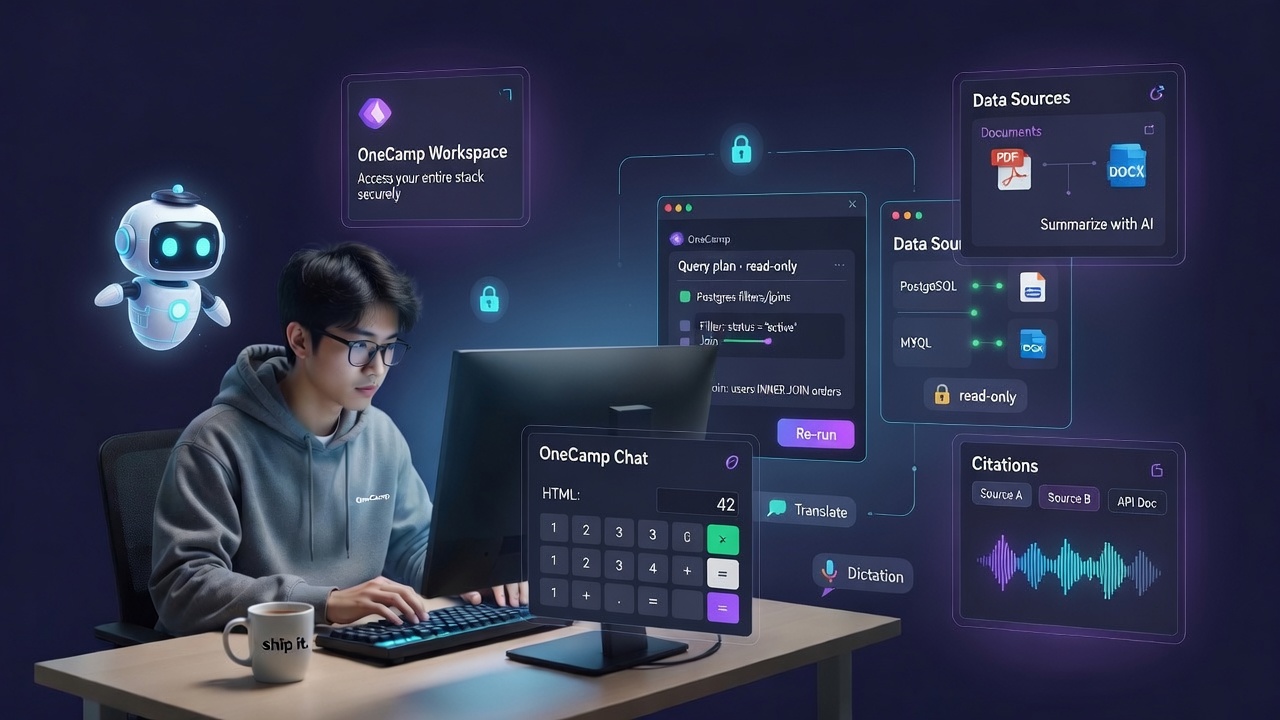
OneCamp already had Notion-style Tables, and an agent could reason over them. But most teams’ real numbers don’t live in a workspace table, they live in a production Postgres or MySQL. So OneCamp now has Data Sources: connect an external database and let the agent answer questions from it, with the guardrails turned all the way up.
The design rule was simple and non-negotiable: read-only, and never a blind query.
- Governed, read-only connector. You add a source from a Notion-like admin UI, pick the engine (PostgreSQL or MySQL, behind a generic dialect/engine registry so more can follow), and test the connection before you save it. Every change to a connection’s config is written to the audit log.
- Deterministic query pushdown, not “the AI wrote some SQL and we ran it.” The agent produces a structured, multi-step query plan, filters, joins, group-bys, and OneCamp compiles that plan into a bounded, read-only query it pushes down to your database. The introspected schema is cached so it isn’t re-read on every question. This is the same disciplined path native Tables use, now pointed at your real data.
- A plan card you can inspect and re-run. The agent doesn’t hand you a number from a black box. It emits an inspectable query-plan card, you can see exactly what it intends to ask, edit it, and re-run it yourself. If the answer looks off, you can see why, and fix the question, instead of arguing with a hallucination.
That last point is the whole philosophy: when an AI touches real data, the data path should be boring, bounded, and legible. You should be able to read what it did and reproduce it. “Trust me” is not a feature.
The Assistant Reads Everything Now 📄
A teammate you have to transcribe things to is only half a teammate. Two gaps closed here.
Documents. Drop a PDF or a Word doc (DOCX, or plain text) into a chat, and the assistant can read it, “Summarize with AI” now works on the attachment itself, right from the lightbox. The spec, the contract, the exported report, the agent reads the actual file instead of asking you to paste the relevant bit.
Answers from your workspace, with receipts. The AI answer over unified search is now grounded and cited, ask a question on the search page and you get a synthesized answer with clickable citations back to the exact messages, docs, and tasks it drew from. No un-checkable claims; every sentence points at where it came from, and every source is one you had permission to see.
Voice In, Translation Out 🎙️
Two small things that change the feel of using it every day:
- Voice dictation. Talk to the composer, or ask the assistant by voice, through OneCamp’s model-agnostic speech-to-text chokepoint (a reusable
useVoiceDictationhook under the hood). Your voice is transcribed by your configured provider, not shipped off to a default cloud you didn’t pick. - One-click translation. Any message translates inline, in channels, DMs, and group chats, on desktop and mobile, routed through the same shared AI path everything else uses. A distributed team stops copy-pasting into a translator tab.
Little Tools You Can Actually Click 🧩
Sometimes the best answer isn’t a paragraph, it’s a thing you can use. The assistant can now produce interactive HTML artifacts, a small calculator, a sortable table, a quick visualizer, and OneCamp renders them in a sandboxed preview right inline. It’s the difference between the AI describing a tool and the AI handing you one, without letting arbitrary markup near the rest of your session.
Replies That Read Like a Conversation 💬
Not everything this stretch was AI. A workspace is a place people talk, and threading was overdue. OneCamp got proper inline reply across channels, DMs, and group chats, on desktop and mobile: quote a message, and the parent renders in-thread and in the right-panel views; click the quoted preview to jump to the parent; the person you replied to gets notified. Deleted parents are filtered out of previews so a reply never points at a ghost. Small feature, big difference in whether a busy channel reads as a conversation or a pile.
Tables Keep Filling Themselves In 🔄
The AI columns in Tables went from a one-shot fill to continuous autofill, flip the per-column toggle and new or edited rows get their AI value computed on change, automatically. A “category” or “sentiment” or “summary” column stays current as the table grows, instead of going stale the moment you stop clicking.
And the Coding Agent Grew Up 🔧
Last week’s post introduced the code-PR agent and was honest that it was new, mechanics at parity with the cloud tools, but with the sovereignty and governance story as the real differentiator. This stretch was about hardening it from “works in a demo” toward “responsible to leave on,” driven by exactly the kind of production log-reading that surfaces the unglamorous truth:
- It works on any repo you can reach, not just “linked” ones, on purpose. Naming
owner/namenow makes the agent target that repo directly, after it verifies your connected account can actually reach it (a fast access check, fail-fast with a clear message if not). The governed path should never be more restricted than the raw tools it replaces. It’s an explicit admin setting, defaulting to the safe linked-only for shared installs, so you opt into the broader reach deliberately. - A model of its own, so coding isn’t starved by chat. The coding runner can now use a dedicated model, separate from your chat model, so a busy chat workload (or a provider’s daily token cap) doesn’t quietly kill code runs. Leave it unset and it uses the chat model as before.
- Raw GitHub writes get routed through the governed path. If an agent reaches for a raw “write this file” tool to hand-roll a commit, OneCamp steers it to the real code-PR path (clone → edit → verify → PR) instead of letting it stall half-way with a dangling branch and no PR.
- Destructive actions stop and ask. Any tool an MCP connector marks destructive, delete, drop, overwrite, force-push, is held for human approval even in full-autonomy mode, and the approval card warns you it’s destructive. Protected branches (
main/master, provider-agnostic across GitHub/GitLab/Gitea/Bitbucket/Azure) are guarded: the agent will not push straight to them. - The transcript tells you why. Every gated tool call now records a structured governance reason, awaiting approval, blocked by policy, so the run history reads as an audit trail, not a mystery.
- And the boring fix that mattered most: when the primary model hits its rate limit and the agent falls back to a local model, it no longer sends a “thinking” flag to a model that doesn’t support it, a one-line bug that used to fail the whole fallback. The kind of thing you only find by reading real logs from a real box.
Honest status, same as last week: the governance around the coding agent is genuinely strong and, for a self-hosted, model-agnostic setup, ahead of the pack. Raw code-quality track record is still something it earns with merged PRs over time, which is why the reliability scorecard and the learning loop exist. I’d rather show you the measurement than sell you a number.
Why Self-Hosted Keeps Winning Here 🏠
Look at the list, query a production database, read a contract PDF, transcribe a voice note, translate a customer message, answer from your private search index, write code against a private repo. Every single one is a capability most tools only offer by sending your data somewhere else. In OneCamp, the database connection, the document, the audio, the search corpus, the repo, the model, all of it stays on infrastructure you own, checked against the same permissions the requesting person has, and bounded by the same budgets you set. The most capable version of the teammate is also the most contained one. That’s the trade I keep optimizing for.
How To Use It 🚀
Connect a database (admin). In Settings → Agents → Data sources, add a PostgreSQL or MySQL connection, pick the engine, and hit Test connection before saving. Then ask an agent a question about it, you’ll get an answer plus an editable query-plan card you can inspect and re-run.
Let it read your files. Drop a PDF or DOCX into any chat and use Summarize with AI from the attachment lightbox. For search, ask on the global search page and read the cited answer.
Talk and translate. Use the mic in the composer (or ask the assistant by voice); hit Translate on any message to render it inline in your language.
Keep Tables current. On an AI column, turn on autofill on change so new and edited rows compute automatically.
Reply in-thread. Quote a message to reply inline, on desktop or mobile; click a reply preview to jump to its parent.
Give the coding agent room (admin). In Admin → AI Models → Code pull requests, optionally set a dedicated code-run model and enable work on any accessible repository if you want the agent to reach beyond linked repos. Keep destructive actions in approval mode, and watch the reliability scorecard before you widen the blast radius.
OneCamp is an open-source, self-hosted, AI-era workspace: chat, docs, tasks, projects, calls, boards, tables, a programmable API, and AI teammates that can now see, calculate, run code, query your databases, read your documents, and open pull requests, all on infrastructure you own, through the model you choose.