
A few weeks ago I wrote about turning OneCamp’s assistant from a chatbot that answers into an agent that does the work: creates tasks, drafts docs, reads then acts, always behind a confirmation gate and the user’s own permissions.
That post ended on a question I had not answered yet: where does the agent live?
A coworker is not a panel you open. It is someone you @mention in a channel, DM when you have a quick question, and trust to check in on a schedule. So the last week of OneCamp was about giving agents a place in the room, and then building the governance that makes handing one to a real team a responsible thing to do rather than a leap of faith.
An Agent Is a Real Member, Not a Pop-up 👥
The headline change: an agent you build in OneCamp can become an actual participant in a conversation.
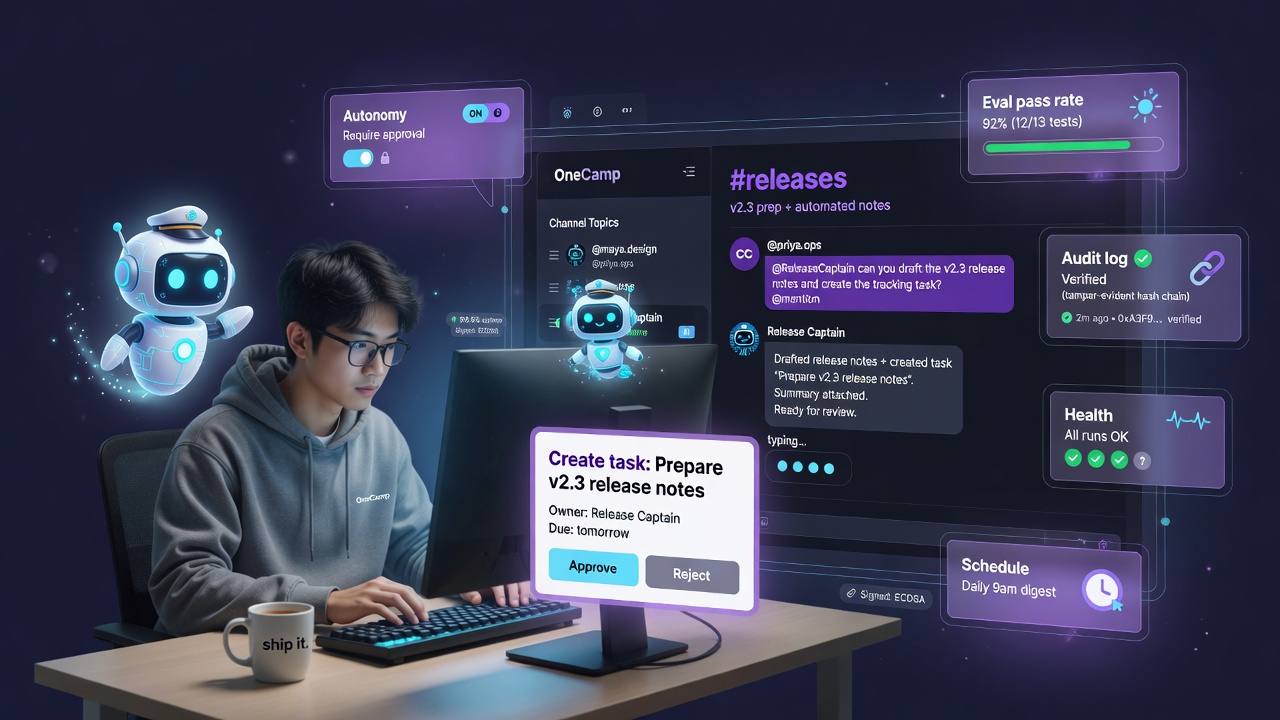
- @mention it in a channel and it replies in-thread, as a named, badged AI member, with its own avatar and the model it was assigned. Not a sidebar. Not a different surface. The same thread your teammates are in.
- DM it 1:1 and you get the full assistant, memory, permission-scoped retrieval, and multi-turn context, scoped to that conversation.
- Add it to a group chat for a shared specialist (a “Release Captain”, a “Support Triage” agent) the whole group can talk to.
While it works, you see a live typing indicator under its own name, so a mentioned agent never feels like a frozen bot. And when it is thinking longer than usual, it still posts something rather than leaving you staring at silence, because an @mention that goes unanswered is worse than a slow answer.
Each agent carries its own principal (a distinct bot identity), so its messages are attributable, its membership shows up in the channel roster, and is_bot flows through message reads and the real-time layer, the UI can badge AI-authored messages live and on reload. The agent is a first-class member, not a string of text pretending to be one.
The mention matching is boundary-aware and channel-scoped: an agent only responds where it was invited (its allowed-channels list), and the typeahead only suggests agents you can actually summon there. No agent barges into a channel it was never added to.
Proactive, Not Just Reactive ⏰
A teammate that only speaks when spoken to is half a teammate. Agents can now run on a schedule and post a proactive check-in to a channel: a standup nudge, a “here’s what’s overdue” summary, a daily digest. You pick the channel, the cadence (daily, weekdays, or a custom set-time), and the instruction. The same agent that answers an @mention can also show up on its own at 9 a.m. with the thing you would have had to ask for.
Schedules are real cron-style recurrence (daily / weekly with specific weekdays at a set minute), and agents can also fire reactively off workspace events, including a new row landing in a OneCamp table. So “when a row is added to the Bugs table, triage it and post to #eng” is a thing an agent does without anyone clicking a button.
Hand It Real Work, and Trust It to Finish 🎯
Answering an @mention is the easy half of being a coworker. The real test is whether you can hand someone a task and walk away. So an AI teammate can now be assigned a task exactly like a person: set it as the assignee on any task, and it picks the work up.
What makes that something you can actually rely on is what happens underneath. An assignment is not a fire-and-forget prompt that lives or dies with one request, it creates a durable job on a real queue:
- It survives a restart. Redeploy the server mid-run and the job is reclaimed and continued, not lost. A teammate that forgets what it was doing every time you ship is not a teammate.
- It resumes the same work. The conversation is checkpointed step by step, so a pause or crash picks up where it left off, and it rebuilds what it has already done so it never repeats a write it already made.
- It retries transient trouble (a rate limit, a brief model outage) with backoff, on its own, without burning through its attempt budget for problems that were never its fault.
- It posts one evolving status comment right on the task: “On it” the moment it starts, a live “Working… (used: search_workspace, create_task)” as stages complete, and the final result in the same comment, so the task thread reads like a teammate narrating progress instead of going dark and surprising you at the end.
- It can multitask. A single AI teammate can work several assigned tasks at once, with a fairness cap so one busy agent never starves the others waiting in line.
And when it genuinely cannot proceed without you, a missing decision, an ambiguous spec, it does not guess and it does not silently fail. It pauses and asks: posts “I’m blocked, here’s what I need, reply to continue” on the task, parks itself, and resumes the instant you reply right there in the thread. The same generic “I need a human” gate works for any agent and any kind of work.
Between runs it keeps short working notes to itself, so a long or scheduled task advances slice by slice instead of starting cold each time. You can read those notes in the agent’s reliability panel, the agent’s own running account of what is done and what is left.
It is deliberately one engine for every kind of async work. A research task, a triage task, and a coding task all ride the same durable machine, just with different tools, rather than a separate bespoke pipeline per use case.
The Hard Part: Governance You Can Actually Trust 🔐
Giving an autonomous teammate write access to your workspace is exactly as scary as it sounds, unless you can answer four questions: Can I control what it does on its own? Can I measure whether it is any good? Can I see everything it did? Can I prove the record was not tampered with?
That is where most of the week actually went.
Governed autonomy: approve the work, not every keystroke
Every agent has an autonomy setting. Two honest modes:
- Require approval for write actions. The agent does all the reading and reasoning, then surfaces an in-thread approval card for anything that changes state (“Create task: Fix login bug”, “Post to #releases”). Nothing happens until a human clicks approve, right there in the conversation. These approvals are durable, backed by a real engine, not a fragile in-memory prompt, so they survive restarts and can’t be lost.
- Act autonomously for teams that have built trust in a specific agent, with the write still bounded by that agent’s scope and the workspace’s token budget.
And because an agent running in approval mode should be transparent, it discloses its proposed actions in the channel reply itself, so everyone in the thread sees what it wanted to do, not just the person who clicks the button.
A real evaluation harness
You ship LLM features and verify them with build and unit tests, but model output quality is usually unmeasured, which is how you end up afraid to ever change the model. So OneCamp got a proper eval harness: you save scored test scenarios (golden prompt → expected behavior) for an agent, run them, and get a pass-rate badge on each agent row in the list. Swap a model, re-run the suite, and see whether quality held. This is what turns “we added AI” into “we can prove the AI still works.”
A tamper-evident audit log
Every consequential action, agent writes, API calls, AI operations, lands in an audit log built as a tamper-evident hash chain: each entry commits to the previous one, so a single altered or deleted row breaks the chain and is detectable. From the admin viewer you can Verify integrity and Export the log as CSV or JSON for your own compliance pipeline. When an agent created something at 3 a.m., there is a trail, and the trail can prove it was not edited after the fact.
Reliability you can see at a glance
Agents now report health. The agents list shows a per-agent health dot and a fleet overview strip (how many agents, recent run success, failures), and each agent’s run-history dialog has a reliability panel plus the full run transcript, so you can read exactly what the agent saw, thought, and did on any given run. Debugging an agent stopped being a mystery.
Spend you can cap, per agent and per channel
An autonomous teammate that quietly bills to whoever owns it is a surprise waiting to happen. So the AI token budget is now a dial you can set per agent and per channel, not just one workspace total. A busy teammate’s spend is billed to its own daily budget instead of eating its owner’s personal quota, each channel can carry its own daily cap (so a chatty channel can’t run up the whole bill), and the admin panel shows today’s top-spending users and channels. When a run hits a cap it does not crash, it pauses and resumes after the budget resets, and tells the team once so a quiet job isn’t mistaken for a stuck one. Cost becomes something you watch on a dashboard, not something you discover later.
Building an Agent Without Writing a Prompt Wall 🧱
The builder got more capable and less fiddly:
- Describe-your-agent creation: type what you want in plain language and OneCamp drafts the agent (name, instructions, suggested tools) for you to refine.
- Reusable skills: shared instruction modules you write once and attach to many agents, so “how we write status updates” lives in one place instead of being copy-pasted into ten prompts.
- Per-agent knowledge sources: ground a specific agent in specific material, so the Support agent answers from the support docs and not the whole workspace.
- A
search_workspacetool: any agent can recall across the whole workspace and your connected accounts (more on that below), so it is not limited to what fits in its prompt. - Per-agent model: each agent runs on the model the admin authorizes for it, with its token cap clearly conveyed in replies. A cheap local model for the chatty agent, a stronger one for the analyst.
- Coding depth, safely: an engineering agent can analyze code, summarize a repo, and read recent changes to ground its answer, all read-only. Anything that writes code stays behind a confirmation and runs through an admin-registered MCP server that honors each tool’s read-only hint, so the agent can reason about your code freely while the vendor and the act of writing stay your explicit choice.
And a Week of AI That Meets You Where You Already Are 🧭
The teammate work was the spine, but the same week shipped a wave of cross-surface AI, all built on the one permission-scoped retrieval-and-action core, so each one is grounded in only what you can see:
- What needs me now: a cross-surface attention queue on your home screen that pulls together mentions, due-soon tasks, and open questions aimed at you, and lets you act on approvals inline without leaving the card.
- Unified search: one search that fans out across your workspace content, your Workspace Memory facts, and connected accounts (Gmail, GitHub), folded right into the Cmd+K palette, with Memory hits that deep-link back to their source. It is also exposed over the public API and MCP under a
search:readscope. - Calendar intelligence: when an event conflicts, “find a better time” proposes and confirms a new slot, and a pre-meeting prep brief assembles what you need to walk in ready, right on the event panel.
- Turn a conversation into tasks: highlight a discussion and extract action items into tasks, reviewed in a batch-approve dialog so nothing is created without a glance.
- Board cluster & synthesize: on a whiteboard, group and summarize the notes already on the canvas, Miro-style, into themes.
- A unified AI activity timeline: one admin view that merges agent runs and AI audit entries into a single “what did the AI do, as whom, and why” feed.
Underneath all of it, two reliability investments landed quietly: JSON-with-corrective-retry everywhere a small local model has to emit structured output (so self-hosted deployments on modest models stay dependable), and meeting recaps that are always written in English regardless of the spoken language, authored as the OneCamp AI bot with an inline “Play recording” button.
Why This Shape, and Why Self-Hosted Makes It Better 🏠
The reason an agent can safely be a real channel member is the same reason the API could safely be opened up: it acts as a real user, checked like a real user, and it can never do more than that user could do by hand. An autonomous agent in a channel is just a member whose write actions you chose to trust, bounded by scope, budget, and an audit trail you can verify.
And every piece of it, the model, the memory, the audit log, the conversations the agent reads, runs on infrastructure you own. A cloud AI teammate means trusting a third party with both your data and the actions taken on it. A self-hosted one means the powerful, autonomous coworker is also the contained one. That is the trade I actually want: maximum capability, zero “where did my data just go.”
How To Use It 🚀
Build an agent. Go to Settings → Agents → New agent. Either describe it in plain language and let OneCamp draft it, or fill it in: name, instructions, the tools it may use, optional skills and knowledge sources, and the model it should run on. Set its autonomy to Require approval to start, you can loosen it later once you trust it.
Put it in a channel. Open a channel, add the agent from the member picker (or the in-channel AI teammates picker), and set its allowed channels. Now anyone in that channel can @mention it and it replies in the thread. If it is in approval mode, write actions show up as approval cards in the thread, click to approve.
DM it. From a new DM, pick the agent (DM-able agents are discoverable there) and talk to it 1:1 with full memory and multi-turn context. Great for a personal “draft this”, “what did I miss”, “summarize this” specialist.
Hand it a task. Open any task and set an AI teammate as the assignee, the same field you’d use for a person. It picks the work up on the durable queue, posts an “On it” then live progress as a comment on the task, asks right there if it gets blocked (reply to unblock it), and posts its result when done, surviving any restart in between.
Make it proactive. In the builder, add a schedule trigger, choose the channel and cadence (daily / weekdays / a set time) and the instruction. Or add an event trigger like a new table row to make it react automatically.
Trust it with evidence. Add a few saved tests to the agent and run them to get a pass-rate badge; check the health dot and run history on the agents list to see how it is doing; set a daily token cap on the agent (and on busy channels) so its spend is bounded and visible; and from Admin → Settings → Audit log, hit Verify integrity and Export when you need a clean compliance record.
Use the cross-surface AI. Watch the “Needs you” card on home and act on approvals inline; press Cmd+K to search across your workspace, memory, and connected apps; on a calendar event use Find a better time and the prep brief; in a chat, extract tasks from the discussion; on a board, Cluster the notes.
OneCamp is an open-source, self-hosted, AI-era workspace: chat, docs, tasks, projects, calls, boards, tables, a programmable API, and AI teammates that live where you work, all on your own infrastructure.